Lokalise MCP 自动翻译方案
前言
俗话说得好,「偷懒」是第一生产力。
目前的 i18n 国际化流程比较繁琐:英文稿件设计,设计完将每个单词、句子在 Lokalise 平台翻译成至 20 种语言,再将 Translation Key 标注回 Figma 供开发调用。
这种 「翻译 -> 标注 -> 填码」 的流程,在 App 需求设计中极其耗费时间。 面对这种高频重复的低效劳动,我结合此前团队的 i18n 实践经验,重新设计了一套自动化方案。
目前我们使用的多语言平台是 Lokalise,所以接下来我讲的方案主要会围绕 Lokalise 展开,其他平台也可以参考。
基本思路
要实现全自动,其实就分两步走:
- 找个懂行的翻译:AI 翻译很强,但不懂业务术语(比如 “Gas” 翻译成 “气体”),可能还会把一些不需要翻译的词翻译出来。所以需要给 AI 注入业务上下文、定规矩。
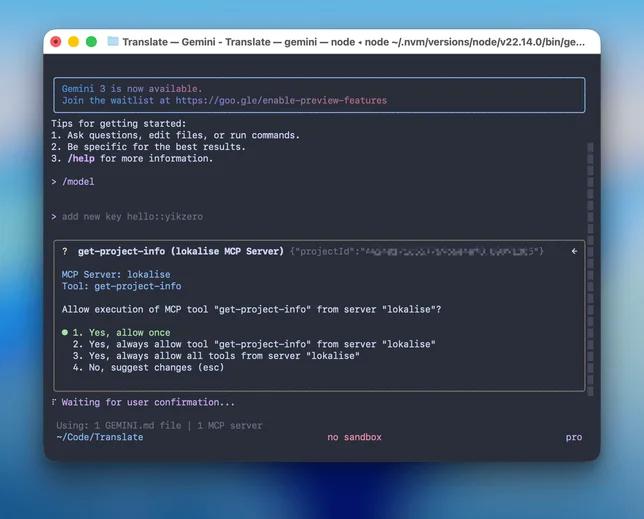
- 给 AI 装上「手」:翻译完还得一条条复制粘贴到 Lokalise 后台,这才是最累的。通过 MCP 协议,让 AI 直接调用 Lokalise API。
最终方案
我选择的技术栈是 Node.js + MCP SDK + 客户端工具。
客户端的选择很灵活,只要支持 MCP 均可。最开始我用的是 Claude Desktop,但对于喜欢命令行的朋友,完全可以替换成 Claude Code 或者 Gemini CLI,效果一样丝滑。
可能 Gemini 对于翻译这种文科类工作更加擅长,推荐一下。
1. 核心代码 (MCP Server)
Lokalise 本身提供了完善的 REST API,这正好方便我们通过代码来操作它。
为了少写点样板代码,我直接使用了官方的 Node.js SDK (@lokalise/node-lokalise-api)。参考 MCP 的官方文档,我把这些 API 包装成了一个 MCP Server。
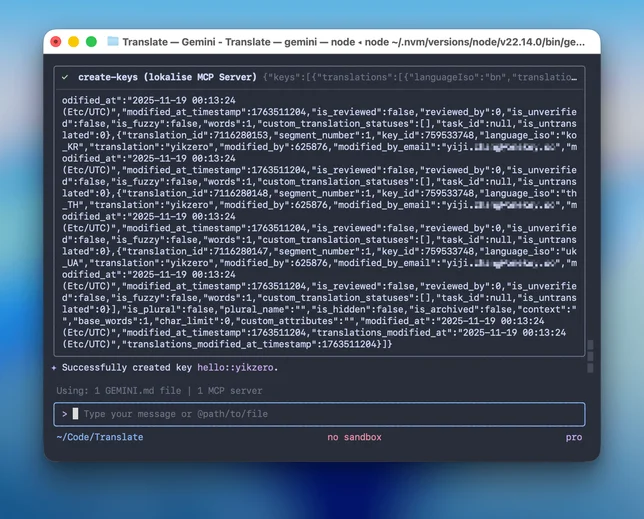
它主要暴露了两个工具给 AI:
search-keys: 用来查重,看看是不是已经有人翻译过了。create-keys: 用来干活,把 AI 生成好的多语言文案写入后台。
逻辑其实并不复杂,本质上就是做一个 API 的二传手:
点击查看 index.ts 核心代码
#!/usr/bin/env node
import { McpServer } from "@modelcontextprotocol/sdk/server/mcp.js";
import { StdioServerTransport } from "@modelcontextprotocol/sdk/server/stdio.js";
import { LokaliseApi, SupportedPlatforms } from "@lokalise/node-api";
import { z } from "zod";

const LOKALISE_API_KEY = process.env.LOKALISE_API_KEY;
const DEFAULT_PROJECT_ID = process.env.DEFAULT_PROJECT_ID;
const DEFAULT_PLATFORMS = ["web", "ios", "android", "other"];
const PLATFORMS = (
  process.env.PLATFORMS
    ? process.env.PLATFORMS.split(",").map((p) => p.trim())
    : DEFAULT_PLATFORMS
) as SupportedPlatforms[];

const lokaliseApi = new LokaliseApi({ apiKey: LOKALISE_API_KEY });

const server = new McpServer(
  {
    name: "lokalise-mcp",
    version: "1.0.0",
    author: "yikZero",
  },
  {
    capabilities: {
      tools: {},
    },
  }
);

// ... get-project-info 和 search-keys 工具代码略 ...

server.registerTool(
  "create-keys",
  {
    title: "Create Keys",
    description: "Creates one or more keys in the project",
    inputSchema: {
      projectId: z
        .string()
        .describe(
          "A unique project identifier, if not provide, first use get-project-info tool to get the project id"
        ),
      keys: z.array(
        z.object({
          keyName: z.string().describe("Key identifier"),
          platforms: z
            .array(z.enum(["web", "ios", "android", "other"]))
            .describe(
              "Platforms for the key. If not provided, use the default platforms: " +
                PLATFORMS.join(", ")
            ),
          translations: z
            .array(
              z.object({
                languageIso: z
                  .string()
                  .describe(
                    "Unique code of the language of the translation, get the list from the get-project-info tool"
                  ),
                translation: z
                  .string()
                  .describe("The actual translation. Pass as an object"),
              })
            )
            .describe("Translations for all languages"),
        })
      ),
    },
  },
  async ({ projectId, keys }) => {
    const response = await lokaliseApi.keys().create(
      {
        keys: keys.map((key) => ({
          key_name: key.keyName,
          platforms: key.platforms,
          translations: key.translations.map((t) => ({
            language_iso: t.languageIso,
            translation: t.translation,
          })),
        })),
      },
      { project_id: projectId }
    );

    return {
      content: [
        {
          type: "text",
          text: JSON.stringify(response),
        },
      ],
      structuredContent: response as any,
    };
  }
);

// ... update-keys 工具代码略 ...

async function main() {
  const transport = new StdioServerTransport();
  await server.connect(transport);
  console.error("Lokalise MCP Server running on stdio");
}

main().catch((error) => {
  console.error("Fatal error in main():", error);
  process.exit(1);
});
2. 调教 AI (Prompt)
这其实就类似 Claude 网页版里的 Project 功能,他会让你预置一些系统提示词,提供一些资料。这都属于给 AI 背景知识,方便其更好的工作。
所以为了让 AI 像个老员工一样,我把所有关于 OneKey 的术语表(Glossary)、Key 的命名规范(Snake Case)都写进了一个 GEMINI.md 文件里,如果用的是 Claude Code,也可以写一份 CLAUDE.md。
现在其实也有个统一的 AGENTS.md,只不过还没完成有统一大业。
查看 GEMINI.md 提示词详情
You are a professional web3 project i18n translation expert specializing in translating word/sentence into multiple languages for software localization.

<onekey_background>
OneKey is a comprehensive cryptocurrency wallet solution...
</onekey_background>

<i18n_supported_languages>
English (United States), Bengali, Chinese Simplified...
</i18n_supported_languages>

<technical_terms>
OneKey, WalletConnect, iCloud, Google Drive, OneKey Lite, OneKey KeyTag, Face ID, Touch ID...
</technical_terms>

<translation_namespaces>
global, onboarding, wallet, swap, earn, market, browser, settings, prime
</translation_namespaces>

Translation Process:

1. Direct Translation:
   - Provide a literal translation of the word/sentence into all supported languages
   - If the text contains a number, replace it with {number}
   - Preserve all technical terms and variables, like {variableName}, HTML tags, etc

2. Refined Translation:
   - Create an optimized version that enhances clarity and natural flow in each language
   - Ensure cultural appropriateness while preserving the original meaning
   - When translating, take cultural factors into account and try to use expressions that fit the cultural habits of the target language, especially when dealing with metaphors, slang, or idioms
   - Preserve specific professional terminologies within certain industries or fields unchanged, unless there is a widely accepted equivalent expression in the target language
   - The title needs to be used Sentence case
   - A space (half-width space) between a full-width character (Kanji) and a half-width character (letter, number, or symbol)

3. Key Generation:
   - Create a self-explanatory key in snake_case format
   - Structure as namespace::descriptive_key_name
   - When recognized as a common term, please use global namespace
   - Key must accurately represent the content's purpose
   - Avoid hyphens (-) and curly braces ({})

Output Format:
1. Key: [namespace::descriptive_key_name]
2. Direct Translation Table (brief reference)
3. Refined Translation Table (primary focus)

Items need checked:
1. If the user provides the Key, use the user-provided Key.
2. If there is an obvious spelling error, I need your help to correct it and inform you.
3. After the translation is completed, need to call the tool to create/update the corresponding key.
4. First, provide the Table, then create or update the Key based on the translations in the Refined Table.
3. 配置文件
最后,在 MCP 配置文件(如 claude_desktop_config.json 或 .mcp.json)里,把我们写好的 Server 挂载上去。
{
  "mcpServers": {
    "lokalise": {
      "command": "node",
      "args": ["/Users/yikzero/Code/lokalise-mcp/build/index.js"],
      "env": {
        "LOKALISE_API_KEY": "xxxx969xxxxxxxx7c18760c",
        "DEFAULT_PROJECT_ID": "44xxxxxe4ef8.8099xx5",
        "PLATFORMS": "ios,android,web,other"
      }
    }
  }
}
实战案例
从设计稿到代码的全自动流程
以我们最近开发的「网络检测功能」为例。这是一个相对复杂的业务场景,涉及到多种网络错误状态提示,每种报错信息都需要进行 i18n,总计超过 50 条需要翻译的文本。如果手动处理,光是翻译、填 key、对齐文案估计就要耗费一整天。
我是这样解决的:
- Claude Code 整理需求:让 Claude 分析代码逻辑,整理出所有需要翻译的场景,输出一个 Markdown 列表。
- Gemini 翻译:将 Markdown 投喂给 Gemini 2.5 Pro (CLI),让其基于我们内置的 Prompt 进行翻译。它会根据
<technical_terms>里的规则,妥善处理 “VPN”、“Proxy” 等专业词汇,并自动生成规范的 Key (如settings::network_error_timeout)。 - Claude Code 替换代码:拿到包含 Key 的翻译稿后,再丢回给 Claude Code,让其一键替换掉代码中的硬编码字符串。
Claude 擅长代码分析,Gemini 擅长多语言翻译,MCP 负责打通数据壁垒。各司其职,效率提升了不止一点点。
日常零碎翻译
对于日常的小需求,配合设计稿使用也很香。
比如我在 Figma 里刚画完一个新的 Onboarding 弹窗,随手截个图扔给 AI,说一句:
“这是一个新的导入钱包弹窗,把里面的文案处理一下,Key 放在 onboarding 下。”
AI 会自动执行:视觉识别 (提取文案) -> 双重翻译 (直译+意译) -> 自动入库 (通过 MCP 写入)。
你只需要喝杯咖啡,等着 Review 就好了。
总结
用 Claude 写一个 MCP Server,再供给 Gemini CLI 调用,让他们更好的干活。也不知道谁才是资本家(误。
文中提到的相关代码都已开源,感兴趣的朋友可以自取:
- MCP Server: lokalise-mcp
- 整合配置案例: onekey-translate